Developer Productivity
8 min read
Updated 2026-10-12
Reverse-Engineering Network Requests: Converting cURL to Python, Node.js & Go Production Clients
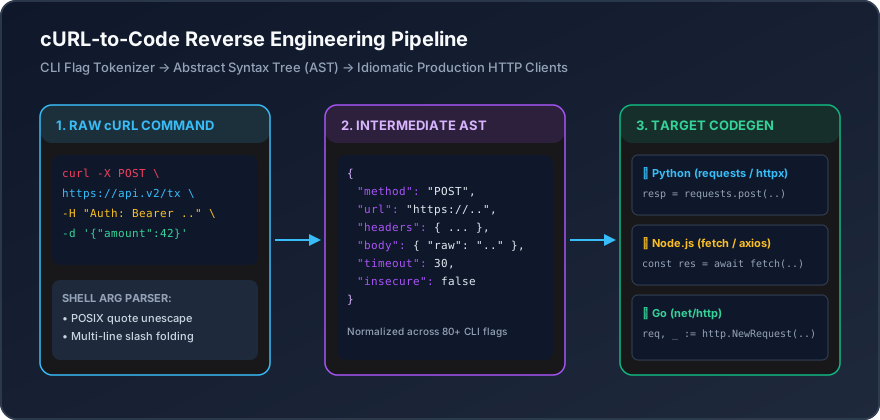
Why cURL is the Gold Standard for API Prototyping
cURL (Client URL), authored by Daniel Stenberg in 1997, is installed on virtually every Linux distribution, macOS terminal, and modern Windows build. When troubleshooting external APIs or debugging microservice endpoints, reproducing an issue with a single cURL command ensures that application code layers, ORMs, and caching tiers are stripped away.
Modern browser Developer Tools (Chrome, Firefox, Safari, Edge) allow developers to right-click any network request in the Network tab and select "Copy as cURL". Turning that raw command into clean, scalable production code is an everyday engineering task.
Decoding Common cURL Flags
-X, --request [METHOD]: Specifies HTTP verb (POST,PUT,DELETE,PATCH).-H, --header "[HEADER]": Passes custom request headers such as Authorization tokens and Content-Type.-d, --data "[BODY]": Sends raw payload data (automatically sets method to POST unless overridden).--compressed: Informs server that client supports gzip, deflate, and brotli compression.-u, --user [USER:PASSWORD]: Encodes credentials into anAuthorization: Basic <base64>header.
Translating cURL to Production Code
1. Node.js (Modern Fetch API)
const response = await fetch('https://api.devdeskapp.com/v1/auth', {
  method: 'POST',
  headers: {
    'Content-Type': 'application/json',
    'Authorization': 'Bearer ' + process.env.API_TOKEN,
  },
  body: JSON.stringify({ tenantId: 'org_123' }),
});

if (!response.ok) {
  throw new Error('HTTP ' + response.status + ': ' + response.statusText);
}

const data = await response.json();
2. Python (Requests Library)
import os
import requests

response = requests.post(
    'https://api.devdeskapp.com/v1/auth',
    headers={
        'Authorization': f"Bearer {os.environ['API_TOKEN']}",
    },
    json={'tenantId': 'org_123'},
    timeout=10,
)
response.raise_for_status()
data = response.json()
Use our interactive cURL to Code Converter to convert any command instantly into dozens of languages and frameworks.
Interactive Tools Mentioned in this Guide
- cURL to Code Converter - Convert cURL commands to Python, JS, Go, and PHP
- HTTP Status Codes - Browse HTTP response status codes and RFC definitions
- URL Encoder / Decoder - Encode and decode query strings and URL components