The Architecture of Cron Expressions: 5-Field vs 6-Field Syntax, Quartz Triggers & Distributed Task Scheduling
The Origins and Mechanics of Unix Cron
Engineered by Ken Thompson and introduced in Version 7 Unix in 1979, cron remains the foundational mechanism for scheduled computing across modern operating systems, cloud task queues, and Kubernetes controllers. At its core, the Unix crond daemon is an event loop that wakes every minute, inspects a table of scheduled jobs (crontab), and fires commands whose temporal criteria match the current system clock.
Understanding the 5-Field Standard POSIX Syntax
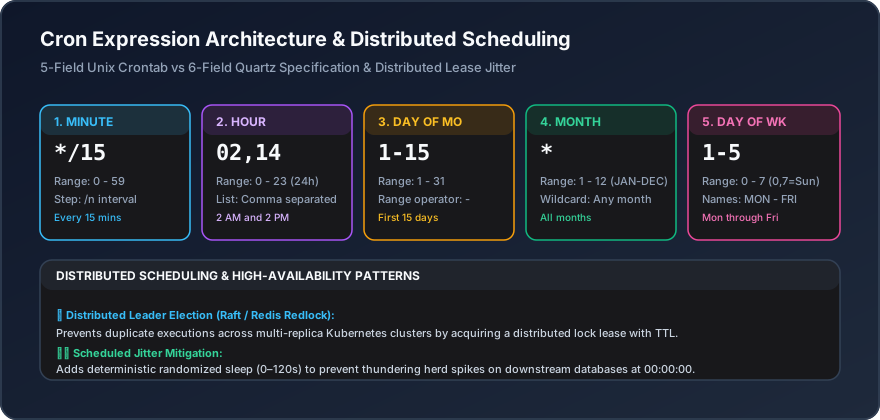
Standard POSIX cron expressions comprise five space-separated fields representing progressively broader units of astronomical time:
┌───────────── Minute (0 - 59)
│ ┌─────────── Hour (0 - 23)
│ │ ┌───────── Day of Month (1 - 31)
│ │ │ ┌─────── Month (1 - 12 or JAN - DEC)
│ │ │ │ ┌───── Day of Week (0 - 6 or SUN - SAT, 0 = Sunday)
│ │ │ │ │
* * * * *
Each field accepts operators that modify its evaluation:
- Asterisk (
*): Wildcard representing every valid unit within the field range. - Comma (
,): Value delimiter for explicit lists (e.g.,15,45runs at minute 15 and 45). - Hyphen (
-): Inclusive range operator (e.g.,1-5in day-of-week specifies Monday through Friday). - Slash (
/): Step interval operator (e.g.,*/15represents every 15 units starting from 0).
The Day-of-Month vs Day-of-Week OR Condition Trap
One of the most frequent architectural pitfalls in cron parsing is the interaction between the Day of Month and Day of Week fields. In standard Unix cron, if both fields are non-wildcard values, they evaluate using logical OR, not logical AND:
// Schedule: 0 0 13 * 5
// Expected by many: "Run on Friday the 13th"
// Reality in POSIX cron: "Run every 13th of the month OR every Friday"
To run a job strictly on Friday the 13th, developers must schedule the job to run every Friday and include an application-level guard checking the date: [ $(date +\%d) -eq 13 ] && run_task.sh.
6-Field Extended and Quartz Syntax
Enterprise job engines (such as Quartz, Spring Scheduler, and AWS EventBridge) expand POSIX cron to six or seven fields to support sub-minute resolution and complex calendar rules:
┌───────────── Seconds (0 - 59)
│ ┌─────────── Minutes (0 - 59)
│ │ ┌───────── Hours (0 - 23)
│ │ │ ┌─────── Day of Month (1 - 31)
│ │ │ │ ┌───── Month (1 - 12)
│ │ │ │ │ ┌─── Day of Week (1 - 7, 1 = Sunday)
│ │ │ │ │ │
0 0 12 ? * MON-FRI  // 12:00 PM every weekday
Quartz introduces specific disambiguation characters:
- Question Mark (
?): Explicitly signifies "no specific value", mandatory for either Day-of-Month or Day-of-Week to avoid the POSIX OR collision. L(Last): In Day-of-Month, represents the final day of the month; in Day-of-Week, represents the last occurrence of a given day (e.g.,5L= last Friday).W(Weekday): Finds the closest weekday to a given date (e.g.,15W).- Hash (
#): Specifies the nth occurrence of a weekday in a month (e.g.,2#3= third Tuesday of the month).
Handling Distributed Cron in Cloud Environments
When running applications across multiple horizontally scaled containers or Kubernetes pods, running cron jobs inside individual containers causes duplicate executions. To coordinate scheduled tasks safely:
- PostgreSQL Advisory Locks: Acquire an in-memory transactional advisory lock (
SELECT pg_try_advisory_lock(task_id)) before starting execution. If another node holds the lock, the current node skips the tick. - Redis Redlock / Leases: Store an expiring key (
SET lock:cron_job UUID NX PX 55000). The node that sets the key executes the task. - Dedicated Orchestration: Decouple task execution from servers using centralized orchestrators like Kubernetes CronJobs, AWS EventBridge, or Temporal workflows.
Interactive Tools Mentioned in this Guide
- Crontab Generator - Build, parse, and validate 5-field and 6-field cron expressions with human-readable explanations.
- Date & Time Converter - Calculate epoch timestamps, ISO 8601 formatting, and UTC timezone offsets.
- Pomodoro Timer - Browser-based focus interval and developer session scheduler.