Under the Hood of Base64 Encoding: Bitwise 6-bit Chunking, Padding Rules & Data URI Trade-offs
Why Base64 Exists: The Legacy 7-Bit ASCII Limitation
Early communication channels like email (SMTP) and Usenet newsgroups were designed to transmit only 7-bit US-ASCII text characters (codes 0 through 127). If binary data (such as an executable file, compressed archive, or image) containing arbitrary 8-bit bytes was transmitted directly, control characters like NUL (0x00), Line Feed (0x0A), or End-of-File markers would corrupt the transmission or terminate connections prematurely.
Base64 (defined in RFC 4648) solves this problem by encoding binary streams into an alphabet of 64 printable, universally safe ASCII characters: uppercase letters (A–Z), lowercase letters (a–z), digits (0–9), plus (+), and slash (/).
The Mathematical Bitwise Conversion
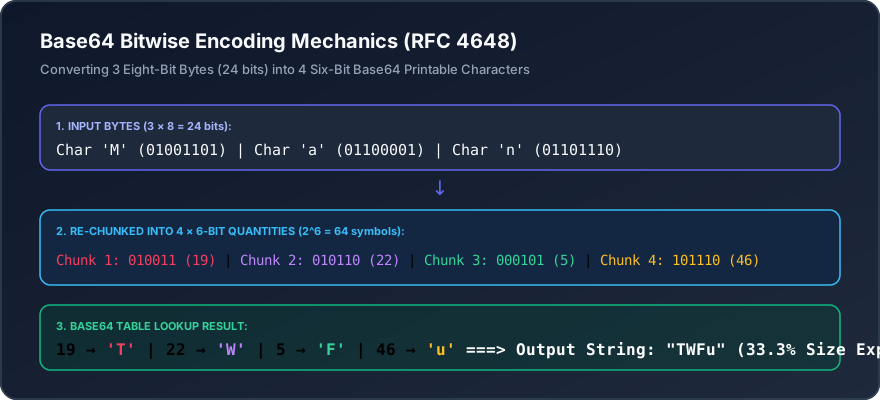
Because an octet contains 8 bits, but Base64 uses a 6-bit index (2^6 = 64), the encoding process takes 3 input bytes (24 bits total) and splits them into 4 groups of 6 bits each:
Input Characters:        M             a             n
ASCII Decimal:           77            97            110
8-bit Binary:        01001101      01100001      01101110
Combined 24-bit:     010011010110000101101110

Split into 6-bit:    010011   010110   000101   101110
Decimal Index:         19       22        5       46
Base64 Character:      T        W         F        u
Result:              "TWFu"
Padding Logic with the Equals Sign (=)
What happens if the input binary data is not an exact multiple of 3 bytes?
- 1 byte remaining (8 bits): Padded with four zeros to make 12 bits, producing two Base64 characters followed by two padding characters (
==). - 2 bytes remaining (16 bits): Padded with two zeros to make 18 bits, producing three Base64 characters followed by one padding character (
=).
The 33% Size Overhead Penalty
Because 3 bytes are expanded into 4 characters, Base64 encoding always increases data size by exactly 33.3% (plus optional padding). When embedding fonts or images as inline Data URIs inside CSS or HTML files, remember that uncompressed network payload weight increases significantly compared to serving raw binary assets over HTTP/2 or HTTP/3 with Brotli compression.
Interactive Tools Mentioned in this Guide
- Base64 String Converter - Encode text strings to Base64 and decode them back
- Base64 File Converter - Convert images, PDFs, and files into Base64 Data URIs
- Bencode Converter - Decode and encode BitTorrent bencode formats